
JioHotstar Ad Removal Trick: Watch Movies Without Ads 2026?
Are you tired of frequent advertisements interrupting your movies and web series on JioHotstar? A trick is going viral on social media that claims to remove advertisements while watching movies and shows. Find out what this trick is, how it works, and whether you can actually watch your favourite content without ads.
Watching movies or web series on JioHotstar can sometimes be frustrating when advertisements appear in the middle of a video. The experience becomes even more annoying when an advertisement suddenly starts playing during an exciting scene, interrupting the entire viewing experience. Now, a trick claiming to solve this problem is going viral on social media.
According to claims circulating online, this method may help users avoid advertisements while watching movies and shows. If you also want to watch your favourite movies and web series without spending extra money, you can try the steps described below. However, this trick may rely on a technical bug in the JioHotstar app that the company could fix later. At present, there is no confirmed evidence that this method works reliably for everyone.
How to Remove Ads on JioHotstar?
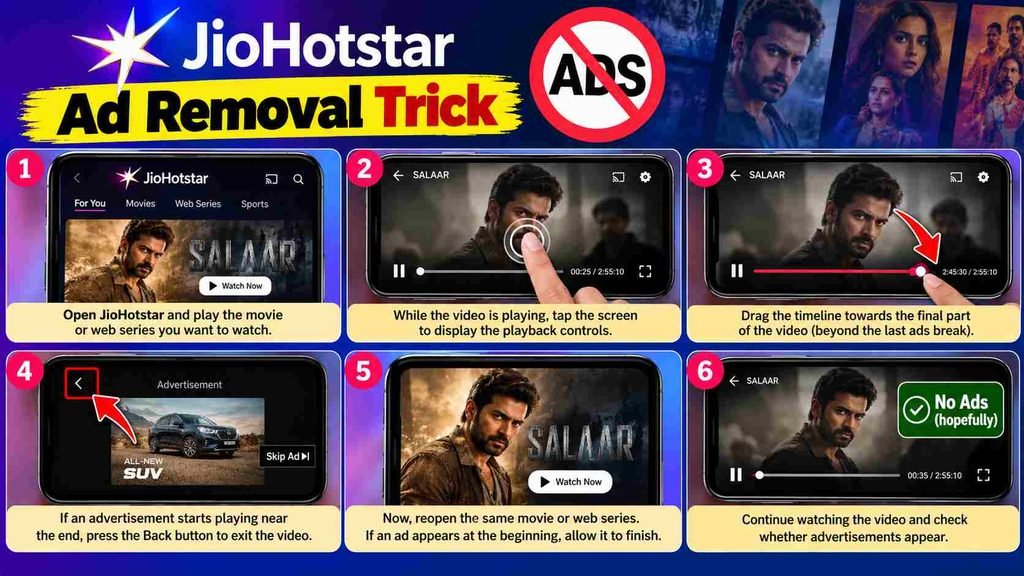
According to information shared on social media, users need to follow these steps to try the viral JioHotstar ad removal trick.
1. Open JioHotstar: First, open the JioHotstar app and play the movie or web series you want to watch.
2. Access the video timeline: While the video is playing, tap the screen. A timeline will appear at the bottom, allowing you to move forward or backward through the video.
3. Move the video forward: Drag the timeline towards the final part of the video. The viral trick suggests moving beyond the last advertising break.
4. Exit the video: If an advertisement starts playing near the end, press the Back button to exit the video.
5. Play the video again: Now, reopen the same movie or web series. If an advertisement appears at the beginning, allow it to finish playing.
6. Check whether advertisements appear: After completing these steps, continue watching the video and check whether advertisements appear in the middle of the movie or episode.
People sharing this trick claim that following these steps may prevent advertisements from appearing during video playback. However, it has not been confirmed that this method works for all users.
How Can This Trick Remove Ads on JioHotstar?
The exact reason this trick might work is still unclear. One possibility is that moving through the video timeline and restarting playback triggers a technical glitch in the app, causing advertisements to behave differently.
However, this is only a possible explanation, and the actual cause has not been established.
JioHotstar has not officially confirmed this method as a way to remove advertisements. Therefore, it would be incorrect to claim that the trick will remove all ads or guarantee uninterrupted playback.
Will This JioHotstar Ad Removal Trick Always Work?
There is no guarantee that the JioHotstar ad removal trick will always work. If the method depends on a temporary technical bug, the company could fix it through a future app update or a server-side change.
As a result, the trick may stop working in the future, even if some users find that it works for them now.
If you want to watch movies and web series without frequent advertising interruptions, you can also check the available JioHotstar subscription plans. Before purchasing a plan, carefully review its terms and conditions to understand the advertising rules that apply to your chosen subscription.
At present, there is no confirmed evidence that this viral trick reliably removes advertisements from JioHotstar. Therefore, do not assume that all advertisements will disappear after following these steps.
Frequently Asked Questions (FAQs)
1. Can I watch movies on JioHotstar without ads using this trick?
The viral JioHotstar ad removal trick claims to help users avoid advertisements during video playback. However, its effectiveness has not been independently verified, and it may not work for everyone.
2. How does the JioHotstar ad removal trick work?
The method involves moving the video timeline towards the end, exiting the video, and restarting the same content. The exact technical reason behind the claimed results remains unknown.
3. Is the JioHotstar ad removal trick official?
No. JioHotstar has not officially confirmed this method as an approved way to remove advertisements.
4. Will this trick work on every movie and web series?
There is no guarantee that the trick will work on every movie or web series. Its effectiveness may vary depending on the device, app version, video, and advertising system.
5. Can the JioHotstar ad removal trick stop working in the future?
Yes. If the method relies on a temporary technical glitch, a future app update or server-side change could prevent it from working.
Conclusion
The viral JioHotstar ad removal trick has attracted attention from users who want to watch movies and web series without frequent interruptions. The method involves moving towards the end of a video, exiting the player, and restarting playback.
However, there is no reliable confirmation that this trick works consistently or removes all advertisements. If you want a more predictable viewing experience, check JioHotstar’s official subscription plans and review their current advertising policies before purchasing a subscription.
Interested in Smartphones Tech Check this :- Honor Robot Phone: A Smartphone with a Robotic Gimbal Camera 2026


[…] You May Check Out :- JioHotstar Ad Removal Trick: Watch Movies Without Ads 2026? […]