
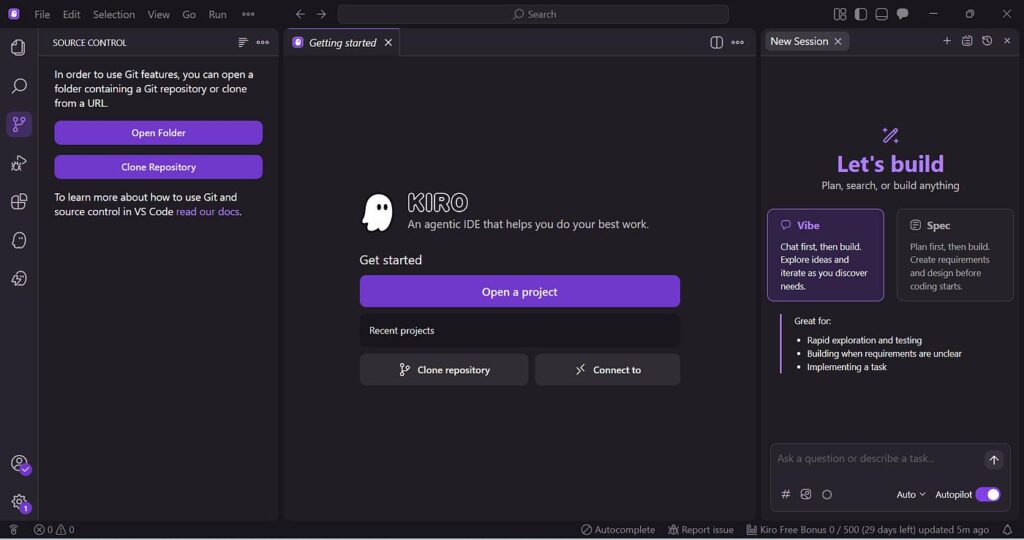
Kiro IDE: Complete Guide to AWS’s AI-Powered Coding IDE
AI is changing the way developers write software. Coding assistants can now generate code, explain errors, create tests, work across multiple files, and help developers build complete features.
But there is a problem with simply asking AI to “build something.” When a project becomes large, AI can misunderstand requirements, make inconsistent decisions, or generate code that works but doesn’t fit the architecture.
This is where Kiro IDE takes a different approach.
Kiro is an agentic development environment from AWS designed to help developers move from an idea or prompt to structured requirements, implementation, tests, and documentation. Instead of treating AI as just a code generator, Kiro is designed to make AI part of the broader software development workflow.
What Is Kiro IDE?
Kiro is an AI-powered IDE that combines a familiar coding environment with AI agents.
You can use natural language to ask Kiro about your codebase, request new features, debug problems, generate tests, and automate development tasks. Kiro is available for Windows, macOS, and Linux, and it supports Open VSX plugins, themes, and VS Code settings.
The interesting part is Kiro’s focus on structured agentic development.
Instead of simply doing:
Prompt → Code
Kiro can follow a workflow closer to:
Idea → Requirements → Design → Tasks → Code → Tests
This is especially useful for larger applications where planning and consistency matter.
What Is Spec-Driven Development in Kiro?
One of Kiro’s main features is Specs.
Specs help developers define a feature before the AI starts implementing it. Kiro can turn a high-level request into structured requirements, a design, and implementation tasks.
For example, you could ask Kiro to build a password-reset system.
Instead of immediately generating code, the workflow can define:
- What users should be able to do
- Authentication requirements
- Database changes
- API requirements
- Error handling
- Security considerations
- Testing requirements
- Individual implementation tasks
This approach can be useful for larger projects because developers can review the plan before allowing the agent to make extensive changes.
Kiro also supports simpler workflows, so you don’t necessarily need a full specification for every small change.
Kiro Steering
Steering allows developers to give Kiro persistent instructions about a project.
For example, a project might require:
- TypeScript for application code
- Specific coding conventions
- A particular folder structure
- Certain testing practices
- Specific frameworks or libraries
Instead of repeating these instructions every time you chat with the AI, you can store them as steering files.
This gives Kiro additional project context and helps agents follow the rules you establish for your codebase.
For teams, this can be particularly useful because project-specific AI instructions can become part of the development environment.
Kiro Hooks
Another important feature is Hooks.
Hooks allow developers to automate repetitive tasks using intelligent triggers. Kiro’s documentation lists hooks as one of its core capabilities alongside Specs, Steering, agentic chat, and MCP.
For example, developers can create workflows that perform actions when certain development events occur.
Possible uses include:
- Generating documentation
- Running tests
- Reviewing changes
- Updating related files
- Automating repetitive development tasks
This means AI doesn’t always have to wait for a developer to manually ask it to perform the same operation.
Kiro and MCP
Kiro also supports Model Context Protocol (MCP).
MCP allows Kiro agents to connect with external tools and data sources. AWS describes Kiro as being able to connect to resources such as documentation, databases, and APIs through MCP.
This can be useful when an application depends on services outside the local codebase.
For example, an agent may need information from an external API or development tool while working on a feature. MCP provides a way to make those external capabilities available to the agent.
What Are Kiro Powers?
Kiro also offers Powers, which package tools, workflows, and best practices for agents.
A Power can include instructions, MCP integrations, and optional steering or hooks. Kiro can activate relevant Powers when they match the task being discussed.
There are curated Powers from partners and community-created Powers, and developers can also create their own.
For example, Kiro’s ecosystem includes Powers related to services and technologies such as Stripe, Supabase, Netlify, Postman, Figma, and AWS tooling.
One useful aspect is that Powers are designed to load relevant context when needed instead of forcing every available tool into every conversation.
Kiro AI Agents
AI agents are central to Kiro.
An agent can work on larger tasks instead of simply suggesting the next line of code.
For example, you might ask:
“Find the reason my authentication tests are failing and fix the issue.”
Kiro can inspect the project, investigate the relevant code, make changes, and run tests.
For a new feature, an agent can also work through the requirements and implementation tasks generated during the development process.
AWS describes Kiro as an environment where agents can turn prompts into specs and then into working code, documentation, and tests.
However, developers should still review AI-generated changes. Agentic tools can make incorrect assumptions, and important production code should never be accepted blindly.
Kiro AI Models
Kiro supports multiple AI models from providers including OpenAI and Anthropic, along with other supported models. It also provides an Auto option that can route tasks to an appropriate model.
This gives developers flexibility.
A small coding change may not require the same model as a complicated architecture or debugging task.
Model availability can depend on the Kiro plan and region, so developers should check the current model list before choosing a subscription.
Kiro Pricing
Kiro currently offers several individual plans:
| Plan | Price | Credits |
|---|---|---|
| Free | $0/month | 50 |
| Pro | $20/month | 1,000 |
| Pro+ | $40/month | 2,000 |
| Pro Max | $100/month | 5,000 |
| Power | $200/month | 10,000 |
The Free plan includes access to open-weight models and Claude Sonnet 4.5, while paid plans provide access to premium models. Paid plans also offer additional credits at $0.04 per credit.
Kiro’s pricing can change, so it is worth checking the official Kiro pricing page before subscribing.
Kiro vs Vibe Coding
Kiro is closely connected to the growing discussion around vibe coding.
Vibe coding can be great for prototypes, experiments, and small applications. You describe what you want, let AI generate the implementation, and continue iterating.
The problem is that larger projects require more planning.
Kiro’s spec-driven approach tries to keep the speed of AI-assisted development while adding more structure. Requirements and design can be established before implementation, making it easier to understand what the agent is actually supposed to build.
For a quick script, that structure may be unnecessary.
For a large SaaS application, API, or full-stack project, it can become much more valuable.
Advantages of Kiro IDE
Structured development: Specs provide a clearer path from an idea to implementation.
Project context: Steering allows developers to define project-specific rules.
Automation: Hooks can handle repetitive tasks.
External integrations: MCP connects agents to external tools and data.
Multiple AI models: Developers can choose from supported models or use Auto.
Familiar environment: Kiro supports VS Code settings and Open VSX plugins.
CLI support: Kiro also provides a command-line interface for developers who prefer terminal workflows.
Disadvantages of Kiro
Kiro isn’t necessarily the right choice for every developer.
For a tiny coding task, a full agentic workflow can be unnecessary. There is also a learning curve because features such as Specs, Steering, Hooks, MCP, and Powers introduce concepts that beginners may not have encountered before.
AI-generated code also still requires human review.
Developers should be especially careful when agents work on authentication, payments, databases, cloud infrastructure, or security-sensitive code.
Kiro itself has also had security issues in earlier releases. AWS has published security bulletins for vulnerabilities affecting older versions, including issues fixed in versions 0.8.0 and 0.11.133. Developers should therefore keep Kiro updated and avoid using outdated releases.
Is Kiro IDE Worth Trying?
If you only want simple AI autocomplete, Kiro may offer more functionality than you need.
But if you want an AI development environment that can help with planning, coding, testing, documentation, and automation, Kiro is worth exploring.
Its biggest difference isn’t simply that it can generate code. Many AI coding tools can do that.
The interesting part is the structure around the AI.
Specs help define what you’re building.
Steering helps explain how your project should be built.
Hooks automate development workflows.
MCP connects agents to external tools.
Powers provide specialized capabilities.
And agents bring these pieces together to work on real development tasks.
Final Verdict
Kiro IDE is AWS’s approach to structured, agentic software development.
It is designed to help developers move from an idea to requirements, implementation, tests, and documentation while keeping the developer involved in the process.
For small projects, you may not need all of its features. But for SaaS applications, full-stack projects, startups, APIs, and larger codebases, Kiro’s structured workflow can be genuinely useful.
The key is not to think of Kiro as a replacement for a developer.
Think of it as a development partner that can handle a growing amount of repetitive work while the developer remains responsible for requirements, architecture, security, and final decisions.
As AI coding tools continue to evolve, that shift—from AI that simply writes code to AI that participates in the software engineering process—is what makes Kiro worth watching.


[…] Kiro takes a somewhat different approach from many AI coding tools. Instead of focusing only on generating code quickly, it emphasizes structured, spec-driven development. […]